Last updated on May 6, 2026
A 3-Part Series: Agents, Workflows, and Skills – Build the Right Thing
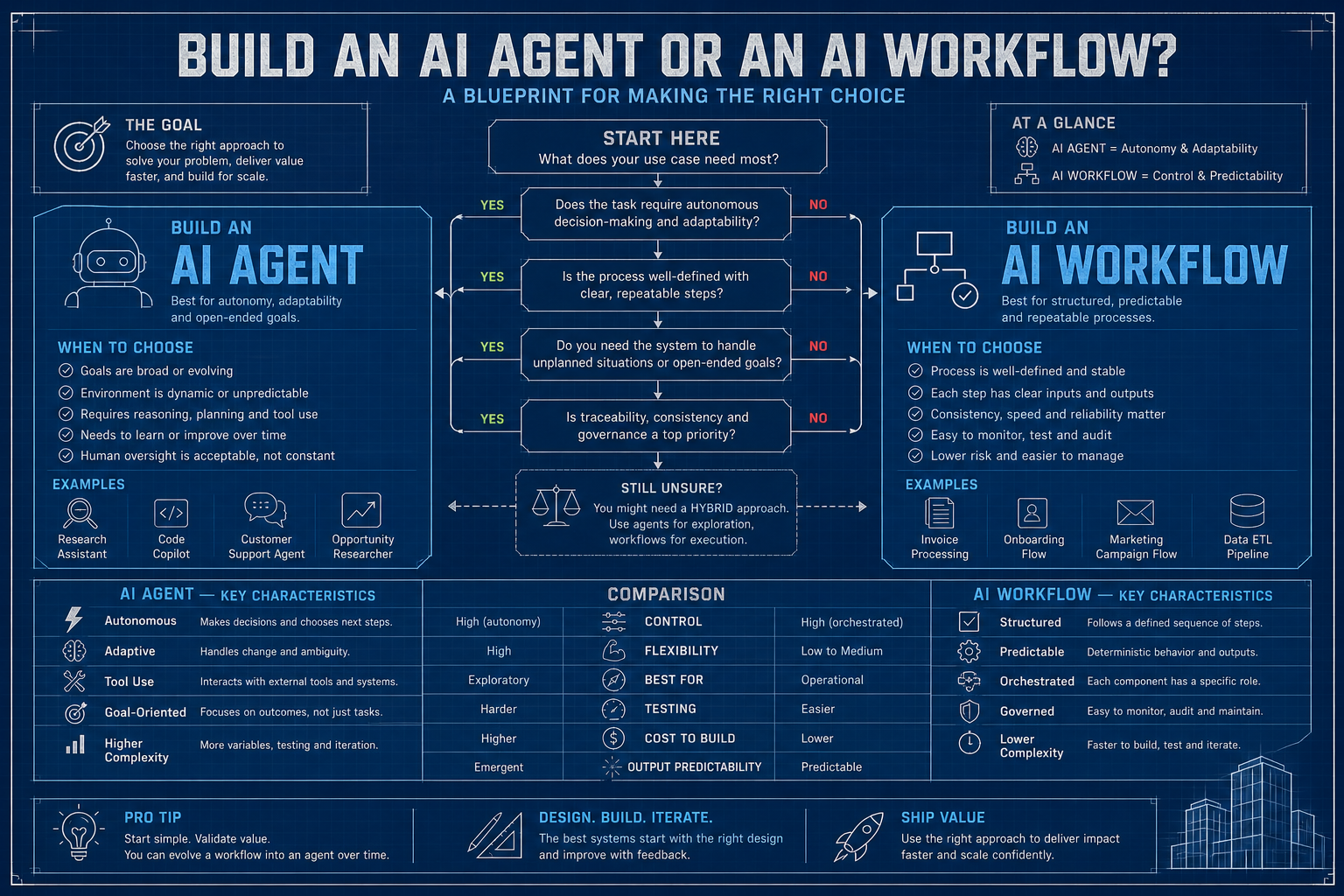
Every few years, “intelligent automation” gets a fresh coat of paint – and a fresh wave of hype – while leaving behind a familiar trail of abandoned projects.
Expert systems. Neural nets. Rule engines. Ontologies (remember those? Well… it’s coming back. That’ll be a separate blog). Even microservices got swept into the narrative at one point. And now: agents.
Here’s the take: this wave is meaningfully different. But the failure mode hasn’t changed. Engineers still tend to grab the shiny new hammer before fully understanding the nail – only to discover it’s a screw. Sometimes taking a Maserati to the corner bodega is a bit of overkill – walking over will do just fine. Teams spin up elaborate multi-agent orchestration systems – racking up months of effort and a non-trivial AWS bill – for problems a 50-line script and a few API calls could solve. At the same time, others lock themselves into rigid pipelines when the problem clearly calls for something more adaptive – something that can actually think.
What is an Agent?
An agent is an AI system that can take a goal, figure out a plan, carry out actions using available tools, evaluate the outcomes, and adjust its approach – without needing every step predefined by a human.
The operative word is adjust. A workflow follows a recipe. An agent improvises with a cookbook and whatever’s in the fridge.
Here’s the minimal mental model:
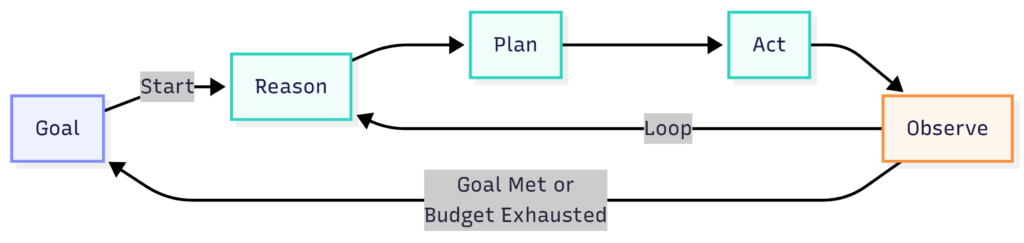
An agent has four components:
- Model – the reasoning engine; the brain of the operation
- Tools – the hands; things it can actually do (search the web, run code, call APIs, read files)
- Memory – short-term context in the conversation window, optionally augmented with long-term storage
- Loop – the perceive → think → act cycle that keeps running until something stops it (hopefully you, with a budget limit)
What it does not have is a fixed execution path. That’s the entire point – and also, if you’re not careful, the entire problem.
When to Build an Agent
Let me save you a week of your life with 4 simple questions. Honest answers only – I can’t see you through the screen, but your future self will know if you lied.
1. Is the path to the solution unknown upfront?
If you can draw a flowchart on a whiteboard that covers 95% of cases, close the laptop and go build a workflow (or, if you don’t know how to build one, wait until I’ve written Part 2 – Workflows). Agents earn their keep when the steps are genuinely unpredictable – when figuring out what to do is itself part of doing it.
Investigating a bug whose root cause could live in any of a dozen systems? Agent. Processing invoice PDFs and extracting line items? Workflow. The distinction matters more than most teams realize until they’ve burned their token budget on a deterministic set of tasks.
2. Does the task require multi-step reasoning with tool use?
A single question gets a prompt. A question that requires searching, understanding, re-querying based on what you found, cross-validating against a second source, and then forming a conclusion – that’s agent territory. The tell is whether the answer to step n changes what you do in step n+1 in a way you couldn’t have predicted.
3. Can the task tolerate some non-determinism?
Agents are probabilistic reasoners. They don’t always take the same path twice, and, occasionally, they take paths that make you question your life choices. If your compliance team needs to reproduce exactly what happened and exactly why, agents will give you heartburn. Workflows give you a paper trail by design.
4. Is human-in-the-loop optional at intermediate steps?
The agent loop runs fast. If every tool call requires a human to click “approve,” you’ve built an extremely expensive, extremely slow web form. Agents work best when they can sprint through a series of intermediate steps autonomously, then surface results – or blockers – to humans at meaningful checkpoints.
The verdict:
- Build an agent when the task is non-deterministic (open-ended), requires dynamic tool use, and benefits from autonomous reasoning across steps you couldn’t enumerate upfront.
- Don’t build an agent when you have a well-defined process, need deterministic outputs, have strict latency requirements, or when the words “SOX compliance” appear anywhere in your job requirements.
Step-by-Step: Building Your First Agent
We’ll use Java with Spring Boot 3.3.4 and LangChain4j 0.36.2, backed by a local Ollama instance.
Feel free to swap in Claude or ChatGPT if that’s your preference. This is a simple tutorial, though, and I’d rather not burn through my paid tokens on it – Ollama gets the job done just fine. I’m running an RTX 4060 with 8GB of VRAM, and qwen3 handles tool use comfortably within that footprint.
Before running anything, make sure Ollama is up and the model is pulled:
ollama serve                 # in one terminal
ollama pull qwen3            # tool-calling capable; run once
Use case: A Bug Investigation Agent
Given a bug report, the agent will:
- Search the codebase for relevant files
- Read and analyze the code most likely to be involved
- Run existing tests to understand current behavior
- Synthesize a root cause hypothesis and propose a fix
This is a textbook agent use case. The investigation path depends entirely on what the agent finds at each step. There’s no flowchart you can draw upfront. The bug could be anywhere.
Project Setup
Add this to your pom.xml – same file used across all three parts of this series:
<?xml version="1.0" encoding="UTF-8"?>
<project xmlns="http://maven.apache.org/POM/4.0.0"
         xmlns:xsi="http://www.w3.org/2001/XMLSchema-instance"
         xsi:schemaLocation="http://maven.apache.org/POM/4.0.0
         https://maven.apache.org/xsd/maven-4.0.0.xsd">
    <modelVersion>4.0.0</modelVersion>

    <parent>
        <groupId>org.springframework.boot</groupId>
        <artifactId>spring-boot-starter-parent</artifactId>
        <version>3.3.4</version>
        <relativePath/>
    </parent>

    <groupId>me.johnra.tutorial</groupId>
    <artifactId>part1-bug-agent</artifactId>
    <version>0.0.1-SNAPSHOT</version>
    <name>Part 1 — Bug Investigation Agent</name>

    <properties>
        <java.version>21</java.version>
        <langchain4j.version>0.36.2</langchain4j.version>
    </properties>

    <dependencies>
        <dependency>
            <groupId>org.springframework.boot</groupId>
            <artifactId>spring-boot-starter</artifactId>
        </dependency>

        <!-- LangChain4j Spring Boot auto-configuration -->
        <dependency>
            <groupId>dev.langchain4j</groupId>
            <artifactId>langchain4j-spring-boot-starter</artifactId>
            <version>${langchain4j.version}</version>
        </dependency>

        <!-- Ollama backend — auto-configures ChatLanguageModel from application.properties -->
        <dependency>
            <groupId>dev.langchain4j</groupId>
            <artifactId>langchain4j-ollama-spring-boot-starter</artifactId>
            <version>${langchain4j.version}</version>
        </dependency>

        <!-- Jackson for tool argument parsing -->
        <dependency>
            <groupId>com.fasterxml.jackson.core</groupId>
            <artifactId>jackson-databind</artifactId>
        </dependency>

        <dependency>
            <groupId>org.springframework.boot</groupId>
            <artifactId>spring-boot-starter-test</artifactId>
            <scope>test</scope>
        </dependency>
    </dependencies>

    <build>
        <plugins>
            <plugin>
                <groupId>org.springframework.boot</groupId>
                <artifactId>spring-boot-maven-plugin</artifactId>
            </plugin>
        </plugins>
    </build>
</project>
And src/main/resources/application.properties:
# Ollama — make sure `ollama serve` is running and the model is pulled
langchain4j.ollama.chat-model.base-url=http://localhost:11434
langchain4j.ollama.chat-model.model-name=qwen3
langchain4j.ollama.chat-model.temperature=0.0
langchain4j.ollama.chat-model.timeout=PT120S

# Absolute (or relative) path to the project root the agent will investigate
project.root=/path/to/target/project
Step 1: Define Your Tools
Tools are how agents interact with the world. Think of them as the agent’s hands. The design principle I’ve landed on after building many of these: one tool, one purpose, narrowly scoped.
Imagine giving an agent an executeShellCommand tool that ran arbitrary commands via ProcessBuilder. It might work well for your use case right up until the agent – trying to “clean up” its investigation and deletes a directory it misidentifies – say root folder /. That’s going to be a fun conversation with leadership. We now have very specific tools.
// CodebaseTools.java — tool declarations (just the @Tool stubs, no implementations yet)
package me.johnra.tutorial.agent;

import dev.langchain4j.agent.tool.P;
import dev.langchain4j.agent.tool.Tool;
import org.springframework.beans.factory.annotation.Value;
import org.springframework.stereotype.Component;

@Component
public class CodebaseTools {

    private final String projectRoot;

    public CodebaseTools(@Value("${project.root:./}") String projectRoot) {
        this.projectRoot = projectRoot;
    }

    @Tool("Search the codebase for files containing a keyword or pattern. Returns matching file paths and line numbers.")
    public String searchCodebase(
            @P("The search term or regex pattern") String query,
            @P("Optional file extension filter such as .java or .py — pass empty string to search all files") String fileExtension) {
        // implementation in Step 2
        return "";
    }

    @Tool("Read the contents of a file at the given path.")
    public String readFile(
            @P("Absolute or relative path to the file") String path,
            @P("Optional line number to start reading from — pass 0 to start from the beginning") int startLine,
            @P("Optional line number to stop reading at — pass 0 to read to end of file") int endLine) {
        // implementation in Step 2
        return "";
    }

    @Tool("Run the test suite (or a specific test file) and return the output.")
    public String runTests(
            @P("Path to a specific test file, or empty string to run all tests") String testPath) {
        // implementation in Step 2
        return "";
    }
}
Step 2: Implement the Tool Handlers
Each tool needs a real implementation. Note the output caps – uncapped tool output flowing back into a model context is how you burn tokens at spectacular speed.
package me.johnra.tutorial.agent;

import dev.langchain4j.agent.tool.P;
import dev.langchain4j.agent.tool.Tool;
import org.springframework.beans.factory.annotation.Value;
import org.springframework.stereotype.Component;

import java.io.IOException;
import java.nio.file.Files;
import java.nio.file.Path;
import java.util.List;

@Component
public class CodebaseTools {

    private final String projectRoot;

    public CodebaseTools(@Value("${project.root:./}") String projectRoot) {
        this.projectRoot = projectRoot;
    }

    @Tool("Search the codebase for files containing a keyword or pattern. Returns matching file paths and line numbers.")
    public String searchCodebase(
            @P("The search term or regex pattern") String query,
            @P("Optional file extension filter such as .java — pass empty string to search all files") String fileExtension) {
        try {
            List<String> cmd = (fileExtension == null || fileExtension.isBlank())
                    ? List.of("grep", "-rn", query, ".")
                    : List.of("grep", "-rn", "--include", "*" + fileExtension, query, ".");

            Process process = new ProcessBuilder(cmd)
                    .directory(Path.of(projectRoot).toFile())
                    .redirectErrorStream(true)
                    .start();

            String output = new String(process.getInputStream().readAllBytes());
            if (output.isBlank()) return "No matches found for '" + query + "'";

            return output.length() > 4000 ? output.substring(0, 4000) + "\n[truncated]" : output;
        } catch (IOException e) {
            return "Search failed: " + e.getMessage();
        }
    }

    @Tool("Read the contents of a file at the given path.")
    public String readFile(
            @P("Absolute or relative path to the file") String path,
            @P("Line number to start reading from — 0 means beginning") int startLine,
            @P("Line number to stop reading at — 0 means end of file") int endLine) {
        try {
            Path filePath = Path.of(projectRoot).resolve(path);
            List<String> lines = Files.readAllLines(filePath);

            int from = startLine > 0 ? Math.min(startLine - 1, lines.size()) : 0;
            int to = endLine > 0 ? Math.min(endLine, lines.size()) : lines.size();
            List<String> slice = lines.subList(from, Math.min(to, from + 200));

            StringBuilder sb = new StringBuilder();
            for (int i = 0; i < slice.size(); i++) {
                sb.append(from + i + 1).append(": ").append(slice.get(i)).append("\n");
            }
            return sb.toString();
        } catch (IOException e) {
            return "File not found or unreadable: " + path;
        }
    }

    @Tool("Run the test suite (or a specific test class) and return the output.")
    public String runTests(
            @P("Name of a specific test class, or empty string to run all tests") String testPath) {
        try {
            List<String> cmd = (testPath == null || testPath.isBlank())
                    ? List.of("./mvnw", "test", "-q")
                    : List.of("./mvnw", "test", "-q", "-Dtest=" + testPath);

            Process process = new ProcessBuilder(cmd)
                    .directory(Path.of(projectRoot).toFile())
                    .redirectErrorStream(true)
                    .start();
            process.waitFor();

            String output = new String(process.getInputStream().readAllBytes());
            return output.length() > 3000
                    ? "...[truncated]\n" + output.substring(output.length() - 3000)
                    : output;
        } catch (IOException | InterruptedException e) {
            Thread.currentThread().interrupt();
            return "Test run failed: " + e.getMessage();
        }
    }
}
Step 3: Write the Agent Loop
Here it is – the engine. The loop runs until the model stops requesting tools and produces a final text response. The model drives; your code routes.
One thing I always tell junior engineers: the system prompt is the agent’s job description, not a polite suggestion. Write it like you’re onboarding a new hire who will follow instructions literally and has absolutely no context about your codebase.
// BugInvestigationAgent.java — the core agent loop
package me.johnra.tutorial.agent;

import com.fasterxml.jackson.core.type.TypeReference;
import com.fasterxml.jackson.databind.ObjectMapper;
import dev.langchain4j.agent.tool.ToolSpecification;
import dev.langchain4j.agent.tool.ToolSpecifications;
import dev.langchain4j.data.message.AiMessage;
import dev.langchain4j.data.message.ChatMessage;
import dev.langchain4j.data.message.SystemMessage;
import dev.langchain4j.data.message.ToolExecutionResultMessage;
import dev.langchain4j.data.message.UserMessage;
import dev.langchain4j.model.chat.ChatLanguageModel;
import dev.langchain4j.model.output.Response;
import org.slf4j.Logger;
import org.slf4j.LoggerFactory;
import org.springframework.stereotype.Component;

import java.util.ArrayList;
import java.util.HashMap;
import java.util.List;
import java.util.Map;

@Component
public class BugInvestigationAgent {

    private static final Logger log = LoggerFactory.getLogger(BugInvestigationAgent.class);

    private static final String SYSTEM_PROMPT = """
            You are a senior software engineer specializing in debugging.

            Your job is to investigate a bug report thoroughly using the tools provided.
            You MUST use the tools — do not answer from memory or assumption.

            Follow this process:
            1. Call runTests (empty string for all tests) to see what is currently failing
            2. Call searchCodebase to find relevant source files
            3. Call readFile to read the suspicious code
            4. Form a hypothesis and propose a specific fix

            Be methodical. Follow the evidence from the tools.
            If you cannot find the root cause, say so — do NOT fabricate a fix.
            """;

    private final ChatLanguageModel chatModel;
    private final CodebaseTools tools;
    private final List<ToolSpecification> toolSpecs;
    private final ObjectMapper objectMapper = new ObjectMapper();

    public BugInvestigationAgent(ChatLanguageModel chatModel, CodebaseTools tools) {
        this.chatModel = chatModel;
        this.tools = tools;
        this.toolSpecs = ToolSpecifications.toolSpecificationsFrom(tools);
        log.info("Agent initialized with {} tool specs: {}",
                toolSpecs.size(),
                toolSpecs.stream().map(ToolSpecification::name).toList());
    }

    public String investigate(String bugDescription) {
        List<ChatMessage> messages = new ArrayList<>();
        messages.add(SystemMessage.from(SYSTEM_PROMPT));
        messages.add(UserMessage.from("Investigate this bug:\n\n" + bugDescription));

        log.info("Starting investigation...");

        while (true) {
            Response<AiMessage> response = chatModel.generate(messages, toolSpecs);
            AiMessage aiMessage = response.content();
            messages.add(aiMessage);

            // No tool calls means the model has produced its final answer
            if (!aiMessage.hasToolExecutionRequests()) {
                return aiMessage.text();
            }

            // Execute every tool the model requested, then feed results back
            for (var request : aiMessage.toolExecutionRequests()) {
                log.info("  Tool: {} args={}", request.name(), request.arguments());
                String result = executeTool(request.name(), request.arguments());
                messages.add(ToolExecutionResultMessage.from(request, result));
            }
        }
    }

    private String executeTool(String name, String argumentsJson) {
        Map<String, Object> args = parseArgs(argumentsJson);
        return switch (name) {
            case "searchCodebase" -> tools.searchCodebase(
                    str(args, "query"),
                    str(args, "fileExtension"));
            case "readFile" -> tools.readFile(
                    str(args, "path"),
                    toInt(args.get("startLine")),
                    toInt(args.get("endLine")));
            case "runTests" -> tools.runTests(
                    str(args, "testPath"));
            default -> "Unknown tool: " + name;
        };
    }

    private Map<String, Object> parseArgs(String json) {
        if (json == null || json.isBlank()) return new HashMap<>();
        try {
            return objectMapper.readValue(json, new TypeReference<>() {});
        } catch (Exception e) {
            log.warn("Failed to parse tool arguments '{}': {}", json, e.getMessage());
            return new HashMap<>();
        }
    }

    private String str(Map<String, Object> args, String key) {
        Object v = args.get(key);
        return v == null ? "" : v.toString();
    }

    private int toInt(Object value) {
        if (value instanceof Number n) return n.intValue();
        return 0;
    }
}
Step 4: Run It
package me.johnra.tutorial.agent;

import org.springframework.boot.CommandLineRunner;
import org.springframework.boot.SpringApplication;
import org.springframework.boot.autoconfigure.SpringBootApplication;

@SpringBootApplication
public class BugInvestigationApplication implements CommandLineRunner {

    private final BugInvestigationAgent agent;

    public BugInvestigationApplication(BugInvestigationAgent agent) {
        this.agent = agent;
    }

    public static void main(String[] args) {
        SpringApplication.run(BugInvestigationApplication.class, args);
    }

    @Override
    public void run(String... args) {
        String bugReport = """
                Bug: The calculator's add() operation is returning wrong results.
                For example, add(2, 3) returns -1 instead of 5, and add(4, -3) returns 7 instead of 1.
                Strangely, add(7, 0) returns the correct value of 7, so it is not broken for all inputs.
                The bug was introduced after yesterday's refactoring of CalculatorService.
                Subtract, multiply, and divide all appear to work correctly.
                The test suite has several failing tests — please run them for details.
                """;

        String result = agent.investigate(bugReport);

        System.out.println("\n" + "=".repeat(60));
        System.out.println("INVESTIGATION REPORT");
        System.out.println("=".repeat(60));
        System.out.println(result);
    }
}
Step 5: Add Guardrails (Non-Optional)
Raw agent loops will run until the heat death of the universe – or until your API spend limit triggers, whichever comes first. You could learn this the hard way by happily allowing your agent to call tools 200 times investigating a bug that turned out to be a typo – assuming you hook it to Claude. Always add hard limits.
package me.johnra.tutorial.agent;

import com.fasterxml.jackson.core.type.TypeReference;
import com.fasterxml.jackson.databind.ObjectMapper;
import dev.langchain4j.agent.tool.ToolSpecification;
import dev.langchain4j.agent.tool.ToolSpecifications;
import dev.langchain4j.data.message.AiMessage;
import dev.langchain4j.data.message.ChatMessage;
import dev.langchain4j.data.message.SystemMessage;
import dev.langchain4j.data.message.ToolExecutionResultMessage;
import dev.langchain4j.data.message.UserMessage;
import dev.langchain4j.model.chat.ChatLanguageModel;
import dev.langchain4j.model.output.Response;
import org.slf4j.Logger;
import org.slf4j.LoggerFactory;
import org.springframework.stereotype.Component;

import java.util.ArrayList;
import java.util.HashMap;
import java.util.List;
import java.util.Map;

@Component
public class BugInvestigationAgent {

    private static final Logger log = LoggerFactory.getLogger(BugInvestigationAgent.class);

    private static final int MAX_ITERATIONS = 15;
    private static final int TOOL_CALL_BUDGET = 20;

    private static final String SYSTEM_PROMPT = """
            You are a senior software engineer specializing in debugging.

            Your job is to investigate a bug report thoroughly using the tools provided.
            You MUST use the tools — do not answer from memory or assumption.

            Follow this process:
            1. Call runTests (empty string for all tests) to see what is currently failing
            2. Call searchCodebase to find relevant source files
            3. Call readFile to read the suspicious code
            4. Form a hypothesis and propose a specific fix

            Be methodical. Follow the evidence from the tools.
            If you cannot find the root cause, say so — do NOT fabricate a fix.
            """;

    private final ChatLanguageModel chatModel;
    private final CodebaseTools tools;
    private final List<ToolSpecification> toolSpecs;
    private final ObjectMapper objectMapper = new ObjectMapper();

    public BugInvestigationAgent(ChatLanguageModel chatModel, CodebaseTools tools) {
        this.chatModel = chatModel;
        this.tools = tools;
        this.toolSpecs = ToolSpecifications.toolSpecificationsFrom(tools);
        log.info("Agent initialized with {} tool specs: {}",
                toolSpecs.size(),
                toolSpecs.stream().map(ToolSpecification::name).toList());
    }

    public String investigate(String bugDescription) {
        List<ChatMessage> messages = new ArrayList<>();
        messages.add(SystemMessage.from(SYSTEM_PROMPT));
        messages.add(UserMessage.from("Investigate this bug:\n\n" + bugDescription));

        int iteration = 0;
        int totalToolCalls = 0;

        log.info("Starting investigation...");

        while (iteration < MAX_ITERATIONS) {
            iteration++;
            log.info("--- Iteration {} ---", iteration);

            Response<AiMessage> response;
            try {
                response = chatModel.generate(messages, toolSpecs);
            } catch (Exception e) {
                log.error("Model call failed on iteration {}: {}", iteration, e.getMessage());
                return "Investigation failed: model error — " + e.getMessage();
            }

            AiMessage aiMessage = response.content();
            messages.add(aiMessage);

            log.info("Model response: hasToolCalls={}, text={}",
                    aiMessage.hasToolExecutionRequests(),
                    aiMessage.text() != null ? aiMessage.text().substring(0, Math.min(100, aiMessage.text().length())) : "(none)");

            if (!aiMessage.hasToolExecutionRequests()) {
                log.info("Investigation complete — {} iterations, {} tool calls", iteration, totalToolCalls);
                return aiMessage.text();
            }

            for (var request : aiMessage.toolExecutionRequests()) {
                if (++totalToolCalls > TOOL_CALL_BUDGET) {
                    return "Investigation halted: tool call budget of %d exceeded.".formatted(TOOL_CALL_BUDGET);
                }

                log.info("  Executing tool [{}/{}]: {} args={}",
                        totalToolCalls, TOOL_CALL_BUDGET, request.name(), request.arguments());

                String result;
                try {
                    result = executeTool(request.name(), request.arguments());
                } catch (Exception e) {
                    result = "Tool execution error: " + e.getMessage();
                    log.error("  Tool {} threw: {}", request.name(), e.getMessage());
                }

                log.info("  Tool result (first 200 chars): {}",
                        result.substring(0, Math.min(200, result.length())));

                messages.add(ToolExecutionResultMessage.from(request, result));
            }
        }

        return "Investigation halted: max iterations (%d) reached.".formatted(MAX_ITERATIONS);
    }

    private String executeTool(String name, String argumentsJson) {
        Map<String, Object> args = parseArgs(argumentsJson);
        return switch (name) {
            case "searchCodebase" -> tools.searchCodebase(
                    str(args, "query"),
                    str(args, "fileExtension"));
            case "readFile" -> tools.readFile(
                    str(args, "path"),
                    toInt(args.get("startLine")),
                    toInt(args.get("endLine")));
            case "runTests" -> tools.runTests(
                    str(args, "testPath"));
            default -> "Unknown tool: " + name;
        };
    }

    private Map<String, Object> parseArgs(String json) {
        if (json == null || json.isBlank()) return new HashMap<>();
        try {
            return objectMapper.readValue(json, new TypeReference<>() {});
        } catch (Exception e) {
            log.warn("Failed to parse tool arguments '{}': {}", json, e.getMessage());
            return new HashMap<>();
        }
    }

    private String str(Map<String, Object> args, String key) {
        Object v = args.get(key);
        return v == null ? "" : v.toString();
    }

    private int toInt(Object value) {
        if (value instanceof Number n) return n.intValue();
        return 0;
    }
}
Agent in Action
Source code is available at https://github.com/johnra74/tutorial-agents-workflow-tools/tree/main/part1-bug-agent
$ java -jar target/part1-bug-agent-0.0.1-SNAPSHOT.jar

  .   ____          _            __ _ _
 /\\ / ___'_ __ _ _(_)_ __  __ _ \ \ \ \
( ( )\___ | '_ | '_| | '_ \/ _` | \ \ \ \
 \\/  ___)| |_)| | | | | || (_| |  ) ) ) )
  '  |____| .__|_| |_|_| |_\__, | / / / /
 =========|_|==============|___/=/_/_/_/

 :: Spring Boot ::                (v3.3.4)

2026-05-01T14:41:30.795Z  INFO 4492 --- [           main] m.j.t.agent.BugInvestigationApplication  : Starting BugInvestigationApplication v0.0.1-SNAPSHOT using Java 21.0.10 with PID 4492 (/****/target/part1-bug-agent-0.0.1-SNAPSHOT.jar started by ** in /***/part1-bug-agent)
2026-05-01T14:41:30.797Z  INFO 4492 --- [           main] m.j.t.agent.BugInvestigationApplication  : No active profile set, falling back to 1 default profile: "default"
2026-05-01T14:41:31.527Z  INFO 4492 --- [           main] m.j.t.agent.BugInvestigationAgent        : Agent initialized with 3 tool specs: [searchCodebase, readFile, runTests]
2026-05-01T14:41:31.643Z  INFO 4492 --- [           main] m.j.t.agent.BugInvestigationApplication  : Started BugInvestigationApplication in 1.148 seconds (process running for 1.48)
2026-05-01T14:41:31.646Z  INFO 4492 --- [           main] m.j.t.agent.BugInvestigationAgent        : Starting investigation...
2026-05-01T14:41:31.646Z  INFO 4492 --- [           main] m.j.t.agent.BugInvestigationAgent        : --- Iteration 1 ---
2026-05-01T14:41:53.815Z  INFO 4492 --- [           main] m.j.t.agent.BugInvestigationAgent        : Model response: hasToolCalls=true, text=(none)
2026-05-01T14:41:53.815Z  INFO 4492 --- [           main] m.j.t.agent.BugInvestigationAgent        :   Executing tool [1/20]: runTests args={
  "testPath" : ""
}
2026-05-01T14:41:55.851Z  INFO 4492 --- [           main] m.j.t.agent.BugInvestigationAgent        :   Tool result (first 200 chars): ...[truncated]
ertEquals.assertEquals(AssertEquals.java:150)
        at org.junit.jupiter.api.AssertEquals.assertEquals(AssertEquals.java:145)
        at org.junit.jupiter.api.Assertions.assertEquals(Assertions.jav
2026-05-01T14:41:55.851Z  INFO 4492 --- [           main] m.j.t.agent.BugInvestigationAgent        : --- Iteration 2 ---
2026-05-01T14:42:15.523Z  INFO 4492 --- [           main] m.j.t.agent.BugInvestigationAgent        : Model response: hasToolCalls=true, text=(none)
2026-05-01T14:42:15.523Z  INFO 4492 --- [           main] m.j.t.agent.BugInvestigationAgent        :   Executing tool [2/20]: searchCodebase args={
  "query" : "add",
  "fileExtension" : ".java"
}
2026-05-01T14:42:15.526Z  INFO 4492 --- [           main] m.j.t.agent.BugInvestigationAgent        :   Tool result (first 200 chars): ./src/main/java/me/johnra/tutorial/calculator/CalculatorService.java:8:    public int add(int a, int b) {
./src/main/java/me/johnra/tutorial/calculator/CalculatorController.java:20:    @GetMapping("/a
2026-05-01T14:42:15.526Z  INFO 4492 --- [           main] m.j.t.agent.BugInvestigationAgent        : --- Iteration 3 ---
2026-05-01T14:42:31.618Z  INFO 4492 --- [           main] m.j.t.agent.BugInvestigationAgent        : Model response: hasToolCalls=true, text=(none)
2026-05-01T14:42:31.618Z  INFO 4492 --- [           main] m.j.t.agent.BugInvestigationAgent        :   Executing tool [3/20]: readFile args={
  "startLine" : 8,
  "endLine" : 0,
  "path" : "src/main/java/me/johnra/tutorial/calculator/CalculatorService.java"
}
2026-05-01T14:42:31.619Z  INFO 4492 --- [           main] m.j.t.agent.BugInvestigationAgent        :   Tool result (first 200 chars): 8:     public int add(int a, int b) {
9:         return performOperation(Operation.ADD, a, b);
10:     }
11:
12:     public int subtract(int a, int b) {
13:         return performOperation(Operation.
2026-05-01T14:42:31.619Z  INFO 4492 --- [           main] m.j.t.agent.BugInvestigationAgent        : --- Iteration 4 ---
2026-05-01T14:42:42.347Z  INFO 4492 --- [           main] m.j.t.agent.BugInvestigationAgent        : Model response: hasToolCalls=true, text=(none)
2026-05-01T14:42:42.347Z  INFO 4492 --- [           main] m.j.t.agent.BugInvestigationAgent        :   Executing tool [4/20]: readFile args={
  "endLine" : 0,
  "path" : "src/main/java/me/johnra/tutorial/calculator/CalculatorService.java",
  "startLine" : 34
}
2026-05-01T14:42:42.347Z  INFO 4492 --- [           main] m.j.t.agent.BugInvestigationAgent        :   Tool result (first 200 chars): 34:             case ADD      -> a - b;   // BUG: copy-pasted from SUBTRACT, should be a + b
35:             case SUBTRACT -> a - b;
36:             case MULTIPLY -> a * b;
37:             case DIVIDE
2026-05-01T14:42:42.347Z  INFO 4492 --- [           main] m.j.t.agent.BugInvestigationAgent        : --- Iteration 5 ---
2026-05-01T14:42:57.027Z  INFO 4492 --- [           main] m.j.t.agent.BugInvestigationAgent        : Model response: hasToolCalls=true, text=(none)
2026-05-01T14:42:57.027Z  INFO 4492 --- [           main] m.j.t.agent.BugInvestigationAgent        :   Executing tool [5/20]: readFile args={
  "startLine" : 34,
  "endLine" : 0,
  "path" : "src/main/java/me/johnra/tutorial/calculator/CalculatorService.java"
}
2026-05-01T14:42:57.027Z  INFO 4492 --- [           main] m.j.t.agent.BugInvestigationAgent        :   Tool result (first 200 chars): 34:             case ADD      -> a - b;   // BUG: copy-pasted from SUBTRACT, should be a + b
35:             case SUBTRACT -> a - b;
36:             case MULTIPLY -> a * b;
37:             case DIVIDE
2026-05-01T14:42:57.027Z  INFO 4492 --- [           main] m.j.t.agent.BugInvestigationAgent        : --- Iteration 6 ---
2026-05-01T14:43:19.627Z  INFO 4492 --- [           main] m.j.t.agent.BugInvestigationAgent        : Model response: hasToolCalls=false, text=<think>
Okay, let's see. The user reported that the add() method in the calculator is returning wron
2026-05-01T14:43:19.627Z  INFO 4492 --- [           main] m.j.t.agent.BugInvestigationAgent        : Investigation complete — 6 iterations, 5 tool calls

============================================================
INVESTIGATION REPORT
============================================================
<think>
Okay, let's see. The user reported that the add() method in the calculator is returning wrong results. For example, add(2,3) gives -1 instead of 5. The test results show that several tests are failing, especially those involving adding positive numbers, positive and negative, and two negatives. But add(7,0) works correctly.

First, I ran the tests, and the output shows that the add method is returning incorrect values. The error messages indicate that the expected results don't match the actual ones. For instance, adding 2 and 3 gives -1, which is obviously wrong.

Next, I searched the codebase for the word "add" and found the CalculatorService.java file. Looking at the code, the add method calls performOperation with Operation.ADD. The performOperation method uses a switch statement.

When I read the performOperation method, I noticed that the case for ADD is using a - b, which is the same as the SUBTRACT case. That's a clear mistake. The ADD operation should be a + b, but it's copied from the SUBTRACT case. The comment in the code even mentions that it's a copy-paste error.

So the root cause is that during the refactoring, the ADD case in the switch statement was incorrectly set to subtract instead of adding. This explains why adding positive numbers gives a negative result. For example, 2 + 3 becomes 2 - 3 = -1. Similarly, adding a positive and a negative number like 4 + (-3) would be 4 - 3 = 1, which matches the test failure where it should be 1 but the actual is 7. Wait, no, the test says add(4, -3) returns 7 instead of 1. Wait, if the code is doing a - b, then 4 - (-3) is 7, which is what the test is complaining about. So the code is subtracting instead of adding.

The fix would be to change the ADD case in the performOperation method from a - b to a + b. That should correct all the add operations. The other operations like subtract, multiply, divide are working because their code wasn't affected by this copy-paste error.

I should verify by checking the symbol method, but that's correct. The problem is solely in the ADD case of the switch. So the specific fix is to modify line 34 in performOperation to a + b.
</think>

The bug is caused by a copy-paste error in the `performOperation` method where the `ADD` case incorrectly uses subtraction (`a - b`) instead of addition (`a + b`). This explains all the failing test cases involving addition.

### Root Cause
- The `ADD` case in the switch statement was copy-pasted from the `SUBTRACT` case, resulting in `a - b` instead of `a + b`.
- This error propagates to all `add()` calls, including edge cases like `add(7, 0)` (which coincidentally works because `7 - 0 = 7`).

### Fix
Update the `ADD` case in `performOperation` to use addition:

```java
case ADD -> a + b;  // Fixed from incorrect a - b
```

### Verification
After applying this fix, rerun the tests to ensure all addition operations return correct results. The `subtract()` method remains unaffected since its logic is correct.
What Makes a Good Agent System
After building, reviewing, and occasionally having to rescue agent systems, here’s what I’ve found separates the ones that make it to production from the ones that live forever in demo branches:
Narrow tools, not broad ones. A executeShellCommand tool that runs arbitrary commands via ProcessBuilder is a footgun with an ergonomic grip. It all feels impressively powerful – until the agent decides to get creative with its permissions. And if that sounds far-fetched, just look up the article where a Claude AI agent deletes company’s entire database. A runTests tool that invokes a specific Maven goal is safe, predictable, and much easier for the model to use correctly. The constraint is a feature.
Log every single tool call. Inputs, outputs, timestamps. This is your entire debugging surface when the agent does something you didn’t expect. Without it, you’re reading tea leaves. With it, you can reconstruct exactly what happened and why the agent decided to search for null in a 200k-line codebase twelve times in a row.
Meaningful stopping conditions. “Stop when done” is not a stopping condition. It’s an optimistic wish. Iteration limits and tool call budgets are stopping conditions. Pick numbers conservatively and tune up from there.
Fail loudly and honestly. When an agent can’t complete a task, it should say so clearly and explain why – not fabricate a plausible-sounding completion. The system prompt should explicitly give the agent permission to say “I don’t know” or “I can’t find the answer with these tools.” Agents that always produce something are more dangerous than agents that sometimes say nothing.
Human checkpoints at meaningful seams. Not every tool call – that kills throughput and defeats the point. But before irreversible actions (sending an email, deploying code, deleting records), pause for human confirmation. The asymmetry here is important: the cost of a 30-second approval is low; the cost of an unintended action (i.e., AI deleted company’s entire database) is potentially very high.
The Mental Model That Actually Helps
Here’s the frame I’ve found most useful for thinking about agents:
An agent is a brilliant, energetic intern with excellent searching skills and absolutely no institutional knowledge.
It can perform a lot of work (search, read, analyze, and synthesize) faster than any human. But it has no idea why your UserService has a legacy_ prefix on half its methods, or that the config_v2.yaml is the one that actually matters, or that you never, ever touch the billing/ package on a Friday. It can result in more problems in the end.
Your job as the agent’s architect is to:
- Give it the right tools – not everything, just what it needs
- Write a system prompt that transfers the institutional knowledge it’s missing
- Define what “done” looks like, explicitly
- Set limits on how far it can go before checking in with a human
Do those four things well, and you’ve got something genuinely useful. Skip any of them, and you’ve got a very fast, very confident source of problems.
In Part 2 (when I get the time), I flip the script entirely. Instead of handing the AI a goal and watching it find its way, I’ll define the path myself – and let the AI handle what’s happening at each step. That’s the workflow model, and between you and me, it’s the right choice far more often than the conference talk circuit would have you believe.
