Last updated on April 22, 2026
The planning session ended. I saved the conversation, and sat for a moment staring at the blank src/ directory on my screen.
I’ve been in software long enough to know that the gap between a good architecture diagram and a working, tested application is where most projects succeed or fail. Anyone can draw boxes and arrows. The execution is where the real engineering happens – where the theory meets the edge cases, where the clean design confronts the messy reality of frameworks, tooling, and the particular perverseness of asynchronous state management.
The question I was asking myself, honestly, was: does this hold up?
What follows is the implementation session. The prompts are real. The code is what was generated. I’ve added my own observations at each stage – the moments of intrigue and the moments of skepticism.
Spoiler: it held up.
Session transcript
Prompt 1 – Project scaffolding
> Set up a React project in the ./game directory with the package.json we planned.
  Include @testing-library/react, jest-dom, and user-event as dev dependencies.
  Add a coverage script that enforces 80% thresholds across all four coverage metrics.
Claude generated game/package.json:
{
  "name": "minesweeper",
  "version": "1.0.0",
  "private": true,
  "dependencies": {
    "react": "^18.2.0",
    "react-dom": "^18.2.0",
    "react-scripts": "5.0.1"
  },
  "devDependencies": {
    "@testing-library/jest-dom": "^5.17.0",
    "@testing-library/react": "^13.4.0",
    "@testing-library/user-event": "^14.5.0"
  },
  "scripts": {
    "start": "react-scripts start",
    "build": "react-scripts build",
    "test": "react-scripts test",
    "test:coverage": "react-scripts test --coverage --watchAll=false"
  },
  "jest": {
    "coverageThreshold": {
      "global": { "branches": 80, "functions": 80, "lines": 80, "statements": 80 }
    },
    "collectCoverageFrom": [
      "src/**/*.{js,jsx}",
      "!src/index.jsx",
      "!src/reportWebVitals.js"
    ]
  }
}
I’ve scaffolded enough projects to know that this step – trivial as it might sound – is actually where a lot of accumulated knowledge lives. Which version of
@testing-library/reactis compatible with your ReactJS version? Whichjest-domversion works without configuration gymnastics? How do you write thecollectCoverageFrompattern so it excludes the right entry files? These are all things you learn from having done it wrong at least once.The
coverageThresholdconfiguration is particularly important. Without it, you can run--coverageall day and get a beautiful HTML report that means nothing, because there’s no enforcement. The threshold gates on CI mean the build fails if coverage drops. That’s the difference between a metric and a standard.
Prompt 2 – Constants
> Implement src/constants/gameConfig.js.
  It must export DIFFICULTIES, GAME_STATUS, and ADJACENT_MINE_COLORS.
  No logic — pure config.
Claude generated src/constants/gameConfig.js:
export const DIFFICULTIES = {
  BEGINNER:     { rows: 9,  cols: 9,  mines: 10, label: 'Beginner'     },
  INTERMEDIATE: { rows: 16, cols: 16, mines: 40, label: 'Intermediate' },
  EXPERT:       { rows: 16, cols: 30, mines: 99, label: 'Expert'        },
};

export const GAME_STATUS = {
  IDLE:    'idle',
  PLAYING: 'playing',
  WON:     'won',
  LOST:    'lost',
};

export const ADJACENT_MINE_COLORS = {
  1: '#0000ff', 2: '#008000', 3: '#ff0000', 4: '#000080',
  5: '#800000', 6: '#008080', 7: '#000000', 8: '#808080',
};
Why this matters: Keeping difficulty configuration in one place means adding an “Ultra” difficulty later is a single object entry – no component or engine code changes.
This is a file that probably gets written in twenty seconds and saves twenty hours. I have seen production codebases – large, mature, professionally maintained codebases – where
9,16,30, and99appear as literal numbers scattered across a dozen files. When someone needs to change the expert board dimensions, they grep for all the places and inevitably miss one, and then Expert mode renders a grid that’s slightly the wrong size and nobody notices for six months.Config files seem boring. They are, in fact, one of the best investments in long-term maintainability you can make. The fact that this came out as the second thing produced – before any logic, before any UI – reflects a discipline that takes discipline to maintain.
Prompt 3 – Board factory
> Implement src/engine/boardFactory.js.
  Export: createCell, createEmptyBoard, placeMines, calculateAdjacentMines.
  All functions must be pure (no side effects, no mutations).
  placeMines must guarantee a 3×3 safe zone around the first-click position.
Claude generated the board factory with detailed JSDoc. The key insight is the buildSafeZone helper:
const buildSafeZone = (rows, cols, safeRow, safeCol) => {
  const safeZone = new Set();
  for (let r = safeRow - 1; r <= safeRow + 1; r++) {
    for (let c = safeCol - 1; c <= safeCol + 1; c++) {
      if (r >= 0 && r < rows && c >= 0 && c < cols) {
        safeZone.add(`${r},${c}`);
      }
    }
  }
  return safeZone;
};

Using a Set<string> of "row,col" keys for O(1) membership tests means the mine placement loop stays O(mines), not O(mines × safeZone).

calculateAdjacentMines uses nested map to return a brand-new board — the original is never touched:
export const calculateAdjacentMines = (board) => {
  const rows = board.length;
  const cols = board[0].length;

  return board.map((row, r) =>
    row.map((cell, c) => {
      if (cell.isMine) return cell;

      let count = 0;
      for (let dr = -1; dr <= 1; dr++) {
        for (let dc = -1; dc <= 1; dc++) {
          if (dr === 0 && dc === 0) continue;
          const nr = r + dr;
          const nc = c + dc;
          if (nr >= 0 && nr < rows && nc >= 0 && nc < cols && board[nr][nc].isMine)
            count++;
        }
      }
      return { ...cell, adjacentMines: count };
    })
  );
};
Two things here that I want to call out, because they’re not obvious.
First: the
Set<string>for the safe zone. The naive approach is to do two nested loops and checkMath.abs(r - safeRow) <= 1 && Math.abs(c - safeCol) <= 1inside the mine placement loop. That works. But it’s O(safeZone) per candidate position, and it scatters the safe-zone logic inside the placement logic where it’s harder to test in isolation. Using aSetprecomputed at the start gives O(1) lookup and a clean separation of concern. It’s a small thing, but it’s the kind of thing that distinguishes someone thinking about the code from someone just making it work.Second: the consistent use of
...spreadto return new objects rather than mutating. Every cell update, every row map, every board transformation returns fresh objects. This has significant practical value: if you’re debugging a state machine and something goes wrong, immutability means you can inspect any historical state snapshot and trust it hasn’t been modified by a later operation. Mutable state debugging is a special kind of misery. I’ve lived it. I don’t miss it.
Prompt 4 – Board factory tests
> Write comprehensive unit tests for boardFactory in boardFactory.test.js.
  Cover: createCell defaults, board dimensions, mine count, safe-zone guarantee,
  adjacency counts for known layouts, immutability.
Claude produced 17 test cases. Highlights:
it('never places a mine within the 3×3 safe zone', () => {
  const board = placeMines(createEmptyBoard(9, 9), 10, 4, 4);
  for (let dr = -1; dr <= 1; dr++)
    for (let dc = -1; dc <= 1; dc++)
      expect(board[4 + dr][4 + dc].isMine).toBe(false);
});

it('counts all 8 neighbours for a centre cell surrounded by mines', () => {
  const board = createEmptyBoard(3, 3);
  const withMines = board.map((row, r) =>
    row.map((cell, c) => (r === 1 && c === 1 ? cell : { ...cell, isMine: true }))
  );
  expect(calculateAdjacentMines(withMines)[1][1].adjacentMines).toBe(8);
});
When I review test files, the first thing I look at is test names. Not code, names. A test named
it('works correctly')tells me nothing and suggests the author didn’t really know what they were testing. A test named'never places a mine within the 3×3 safe zone'is a specification. If it fails, I know exactly what broke and exactly what to look forThe second test – surrounding a center cell with eight mines and checking that the count is eight – is the kind of “known answer” test that makes pure function testing so satisfying. There’s no setup, no mocking, no async. You arrange a board in a known state, apply the function, and check the result. It’s the software equivalent of “1 + 1 = 2.” It either works or it doesn’t, and if it doesn’t, the bug is in the function.
I also noticed: 17 tests for a module with 4 functions. That’s meaningful coverage density. By the time we were done with the full suite, this module would have 100% branch coverage. Every path tested. Every edge handled.
Prompt 5 – Game engine
> Implement src/engine/gameEngine.js.
  Export: revealCell (with BFS flood-fill), toggleFlag, revealAllMines, checkWinCondition.
  All functions must be pure.
Claude explained the BFS reveal:
revealCell(board, row, col)
  ├─ Guard: if already revealed or flagged → return same board
  ├─ Deep-clone the board
  ├─ Mark (row, col) as revealed
  └─ If adjacentMines === 0:
       BFS queue = [(row, col)]
       while queue not empty:
         dequeue (r, c)
         for each of 8 neighbours (nr, nc):
           if in-bounds AND not revealed AND not flagged AND not mine:
             reveal (nr, nc)
             if adjacentMines === 0: enqueue (nr, nc)

The win condition is elegantly compact:

export const checkWinCondition = (board) =>
  board.every((row) =>
    row.every((cell) => (cell.isMine ? !cell.isRevealed : cell.isRevealed))
  );

This reads: "every mine is not revealed AND every non-mine is revealed."
I want to dwell on that
checkWinConditionfunction for a moment, because it’s a small piece of code that does something beautiful.The win condition for Minesweeper can be stated in a complicated way: “all non-mine cells are revealed, and no mine cells are revealed.” It can also be stated in a single
board.every()with a ternary — if the cell is a mine, it must not be revealed; if it isn’t, it must be. Both conditions in one pass, no separate loops, no tracking of revealed counts. It’s not clever in a show-off way; it’s clear in a right-answer way.I’ve reviewed code where this same logic was implemented with three separate boolean flags, a running counter, and a
switchstatement. It worked. It also took me three reads to verify it was correct. This version I understood in fifteen seconds, and that fifteen seconds included formulating the precise natural-language description of what it does.Clarity and correctness are the same thing. When code is clear, it’s verifiable. When it’s verifiable, it’s trustworthy. This function is all three.
Prompt 6 – Game engine tests
> Write unit tests for gameEngine.test.js.
  Cover all paths through revealCell including flood-fill, flag skipping,
  already-revealed no-op. Cover toggleFlag, revealAllMines, checkWinCondition
  including edge cases.
Key test cases Claude wrote:
it('flood-fills through zero-adjacency cells on a safe board', () => {
  // A board with no mines → all adjacentMines = 0 → clicking any cell reveals all.
  const board = makeSafeBoard();
  const result = revealCell(board, 1, 1);
  result.forEach((row) =>
    row.forEach((cell) => expect(cell.isRevealed).toBe(true))
  );
});

it('stops flood-fill at cells with adjacent mine counts > 0', () => {
  const board = makeBoard(); // mine at (0,0)
  const result = revealCell(board, 2, 2);
  expect(result[0][0].isRevealed).toBe(false); // mine untouched
  expect(result[0][1].isRevealed).toBe(true);  // numbered border revealed
  expect(result[1][1].isRevealed).toBe(true);
});
What I find remarkable here is not that the tests exist – I asked for tests – but the quality of the scenarios chosen. The flood-fill test on a mine-free board is exactly the right degenerate case: zero adjacent mines everywhere means BFS should sweep the entire board in one click. If that test passes, you know the BFS termination condition works. If it fails, you know something is fundamentally wrong with the traversal.
The second test is more nuanced. It’s verifying not just that the BFS reveals cells, but that it stops revealing cells at the numbered border. That’s the critical boundary condition. Flood-fill that never stops is worse than no flood-fill at all – you’d reveal the mine and end the game before the player clicked it.
I’ve seen test suites for game logic that tested the happy path and nothing else. They give you false confidence. These tests test the edges, which is where the bugs actually live.
Prompt 7 – useGameState hook
> Implement src/hooks/useGameState.js.
  It should manage: board, gameStatus, difficulty, minesLeft, time.
  Expose: startNewGame, handleCellClick, handleCellRightClick.
  The timer must start on first click and stop on win or loss.
  Use useCallback with correct deps. No game logic here — delegate to the engines.
Claude highlighted one subtle ordering challenge:
When the player makes their first click, I need to both plant mines (modifying the board) and reveal the clicked cell in the same React render cycle. I solved this by using a setBoard functional update — the callback receives the current board, allowing me to chain placeMines → revealCell atomically:

const handleCellClick = useCallback((row, col) => {
  if (gameStatus === GAME_STATUS.WON || gameStatus === GAME_STATUS.LOST) return;

  setBoard((currentBoard) => {
    let workingBoard = currentBoard;

    if (gameStatus === GAME_STATUS.IDLE) {
      setGameStatus(GAME_STATUS.PLAYING);
      workingBoard = placeMines(currentBoard, DIFFICULTIES[difficulty].mines, row, col);
    }

    const cell = workingBoard[row][col];
    if (cell.isFlagged || cell.isRevealed) return currentBoard;

    if (cell.isMine) {
      setGameStatus(GAME_STATUS.LOST);
      return revealAllMines(workingBoard);
    }

    const updatedBoard = revealCell(workingBoard, row, col);
    if (checkWinCondition(updatedBoard)) setGameStatus(GAME_STATUS.WON);
    return updatedBoard;
  });
}, [gameStatus, difficulty]);

The setGameStatus calls inside setBoard are safe: React batches all state updates originating from the same event handler into a single re-render in React 18.

The right-click handler adjusts the mine counter in the same batch:

const handleCellRightClick = useCallback((row, col) => {
  if (gameStatus !== GAME_STATUS.PLAYING) return;

  setBoard((currentBoard) => {
    const newBoard = toggleFlag(currentBoard, row, col);
    const wasFlagged = currentBoard[row][col].isFlagged;
    setMinesLeft((prev) => (wasFlagged ? prev + 1 : prev - 1));
    return newBoard;
  });
}, [gameStatus]);
The first-click atomic update is the kind of ReactJS subtlety that I would genuinely flag in a code review as “this needs a comment explaining why it’s done this way.” The pattern — using a
setBoardfunctional update to get the latest board state, then calling othersetStatefunctions inside it — is valid in React 18, but it’s non-obvious. If you don’t know that React 18 batches state updates from the same event handler, this code looks like it might have a race condition. It doesn’t. But you have to know why it doesn’t.The fact that the explanation came with the code, rather than requiring a follow-up question, is the kind of thing I look for in senior engineers: not just writing code that works, but anticipating the questions a reader will have and answering them proactively.
Prompt 8 — Hook tests
> Write useGameState.test.js using renderHook and act.
  Test: initial state, startNewGame resets, first click transitions,
  mine hit → LOST, all safe → WON, flag/unflag adjusts minesLeft.
  Use jest.spyOn to control placeMines deterministically.
Claude explained why mocking is necessary — and why careful board design matters:
placeMines uses Math.random(). Testing game-over behaviour without controlling mine placement would require either mocking Math.random (fragile) or clicking until we hit a mine by chance (non-deterministic). Spying on placeMines to inject a deterministic board makes the test reliable and readable.

There is a subtle design constraint: the injected board must have the first-clicked cell (4,4) adjacent to at least one mine. If (4,4) has zero adjacent mines, the BFS flood-fill reveals every reachable safe cell — which, with only one mine on the board, is all non-mine cells. checkWinCondition then returns true before we ever get to click the mine. Adding a second mine adjacent to (4,4) stops the flood-fill and keeps the game in PLAYING state until we deliberately click the target mine:

/** Mine at (0,0) to hit; mine at (3,4) adjacent to (4,4) to stop flood-fill. */
const makeBoardForMineHitTest = () => {
  const board = boardFactory.createEmptyBoard(9, 9);
  board[0][0] = { ...board[0][0], isMine: true };
  board[3][4] = { ...board[3][4], isMine: true };
  return boardFactory.calculateAdjacentMines(board);
};

it('transitions to LOST when a mine is clicked', () => {
  jest.spyOn(boardFactory, 'placeMines')
    .mockReturnValue(makeBoardForMineHitTest());

  const { result } = renderHook(() => useGameState('BEGINNER'));
  act(() => result.current.handleCellClick(4, 4)); // first click → PLAYING
  act(() => result.current.handleCellClick(0, 0)); // mine hit → LOST

  expect(result.current.gameStatus).toBe(GAME_STATUS.LOST);
});

For the win condition test the approach is the opposite: inject a mine-free board. The BFS flood-fill then reveals all 81 cells in one click and checkWinCondition returns true naturally — no spy on checkWinCondition needed:

const makeMineFreeBoard = () =>
  boardFactory.calculateAdjacentMines(boardFactory.createEmptyBoard(9, 9));

it('transitions to WON when all non-mine cells are revealed', () => {
  jest.spyOn(boardFactory, 'placeMines').mockReturnValue(makeMineFreeBoard());

  const { result } = renderHook(() => useGameState('BEGINNER'));
  act(() => result.current.handleCellClick(4, 4)); // flood-fills everything → WON

  expect(result.current.gameStatus).toBe(GAME_STATUS.WON);
});

Note: afterEach(() => jest.restoreAllMocks()) guarantees cleanup even if a test throws mid-way, preventing mock leakage across tests. jest.useFakeTimers() in beforeEach isolates timer behaviour and avoids test ordering issues.
Interesting thing happened here.
The first version of the hook tests tried to spy on
gameEngine.checkWinConditiondirectly, usingmockReturnValueOnce(false).mockReturnValue(true)to control exactly when the game would transition to WON. Reasonable idea. Clean intent. And it failed — with a crypticTypeError: Cannot read properties of undefined (reading '4')buried in ReactJS’s internals.The root cause: React 18’s Strict Mode intentionally invokes state updater functions twice in development to help detect side effects. The
mockReturnValueOnce(false)was consumed by the first invocation, leaving subsequent calls to returntrue. The second invocation then tried to access a board state that was in an unexpected intermediate condition. The error was real but the path to it was subtle.The fix: mock
placeMinesinstead ofcheckWinCondition, and design the injected board carefully so that the first click naturally triggers or avoids the win condition – is more elegant than the original approach anyway. It tests the real behaviour, not a mocked shortcut. But finding it required understanding why the failure occurred.Here is what struck me about that debugging exchange. I described the failure, Claude diagnosed the Strict Mode double-invoke behavior, identified the consumed
mockReturnValueOnceas the culprit, and proposed the alternative strategy. What is curious is why it didn’t avoid it in the first place. Why go through this bug. It is intriguing that claude didn’t produce the perfect code the first time around
Prompt 9 – Cell component
> Implement the Cell component in src/components/Cell/Cell.jsx.
  It's a <button> that shows: nothing (hidden), 🚩 (flagged), 💣 (revealed mine),
  or the adjacency number with the correct colour from ADJACENT_MINE_COLORS.
  Wrap with React.memo. Include ARIA attributes.
Claude noted:
getCellContent is extracted as a plain function — not a component method or hook — so it can be tested independently if needed and keeps the JSX declarative:
const getCellContent = (cell) => {
  if (!cell.isRevealed) return cell.isFlagged ? '🚩' : '';
  if (cell.isMine) return '💣';
  if (cell.adjacentMines > 0) return cell.adjacentMines;
  return '';
};

React.memo is important here: the board may contain 480 cells (Expert mode) and the timer fires every second. Without memoisation every tick would re-render all 480 cells even though only GameStatus changed.
CSS follows the classic Windows 95 raised/sunken border technique using border-color rather than box-shadow, for an authentic look on all displays.
The
React.memonote was proactive – I hadn’t mentioned performance. But it’s exactly right. On Expert difficulty the board is 16 rows by 30 columns: 480 cells. The timer increments every second. Without memorization, every timer tick triggers a re-render of all 480 Cell components, even though none of their props changed. WithReact.memo, only theGameStatuscomponent (which displays the timer) re-renders. The cells are blissfully unaware.480 wasted renders per second sounds like nothing on modern hardware. And for this app, it is nothing – the game would run fine either way. But the discipline of applying
React.memoto components that are rendered many times and change rarely is a habit worth having. The same reasoning that makes it irrelevant here makes it essential in a data-heavy dashboard with hundreds of rows. The habit doesn’t know the difference.The Windows 95 border technique for the cell styling also brought a genuine smile. Using
border-colorasymmetry – white on top-left, grey on bottom-right – to simulate the raised button effect, and inverting it on click for the pressed look, is a 30-year-old CSS pattern that still works perfectly. Some techniques age well.
Prompt 10 – GameBoard component
> Implement GameBoard as a CSS grid.
  It receives board, onCellClick, onCellRightClick — no logic, pure rendering.
  Column count must be dynamic based on board width.
Claude:
const GameBoard = ({ board, onCellClick, onCellRightClick }) => {
  const cols = board[0]?.length ?? 0;

  return (
    <div
      className="game-board"
      style={{ gridTemplateColumns: `repeat(${cols}, 28px)` }}
      role="grid"
      aria-label="Minesweeper board"
    >
      {board.map((row, rowIndex) =>
        row.map((cell, colIndex) => (
          <Cell
            key={`${rowIndex}-${colIndex}`}
            cell={cell}
            row={rowIndex}
            col={colIndex}
            onLeftClick={onCellClick}
            onRightClick={onCellRightClick}
          />
        ))
      )}
    </div>
  );
};

Using style for gridTemplateColumns (not a CSS class) means the board adapts to any difficulty without needing a class per size.
The
board[0]?.length ?? 0is a small piece of defensive programming for the empty-board edge case. It’s the kind of line that matters in a library or a framework, and arguably overkill in an application where you control the board initialization. But it costs nothing and prevents a crash if the board ever arrives empty. I’d rather have unnecessary defensive code than a missing guard on the one day the board initialization fails unexpectedly.The inline style for
gridTemplateColumnsis the right call. The alternative — a CSS class per difficulty — would require three hardcoded classes and would break the moment someone added a fourth difficulty from the config. The inline style scales with the config automatically. Small thing, right principle.
Prompt 11 – GameControls component
> Implement GameControls.
  Render a difficulty button for every key in DIFFICULTIES (iterate the config object).
  Highlight the active difficulty via CSS class and aria-pressed.
  A "New Game" button restarts with the current difficulty.
Claude generated a component that derives its buttons directly from the config:
{Object.entries(DIFFICULTIES).map(([key, { label }]) => (
  <button
    key={key}
    className={`difficulty-btn ${key === currentDifficulty ? 'difficulty-btn--active' : ''}`}
    onClick={() => onNewGame(key)}
    aria-pressed={key === currentDifficulty}
  >
    {label}
  </button>
))}

This means if a new difficulty is added to gameConfig.js, a new button appears automatically — the component is open for extension, closed for modification.
This is Open/Closed in practice, not just in theory. The component doesn’t know how many difficulties exist. It doesn’t care. It iterates whatever is in the config and renders a button for each one. Add a “Nightmare” difficulty to the config tomorrow and a fourth button materializes without touching this file.
I’ve seen this pattern violated so many times. The config has three entries, someone hardcodes three buttons, everything’s fine – until the product owner asks for a fourth difficulty and the developer has to find every place in the UI where they hardcoded three. Usually at least one gets missed. Usually it gets found in production.
Iterating the config is one of those decisions that takes approximately the same time to implement as hardcoding, and saves you an undetermined but nonzero amount of pain in the future.
Prompt 12 – GameStatus component
> Implement GameStatus.
  Show a 3-digit zero-padded mine counter (LED style), an emoji face that changes
  with game status, and a 3-digit elapsed timer capped at 999.
  Purely presentational — no state, no effects.
Claude added a time formatter and the face/message maps:
const STATUS_EMOJI   = { idle: '😊', playing: '😮', won: '😎', lost: '😵' };
const STATUS_MESSAGE = {
  idle:    'Click any cell to start!',
  playing: 'Good luck!',
  won:     'You won! Congratulations!',
  lost:    'Game over! Try again.',
};

const formatTime = (seconds) => {
  const mins = Math.floor(seconds / 60).toString().padStart(2, '0');
  const secs = (seconds % 60).toString().padStart(2, '0');
  return `${mins}:${secs}`;
};
The emoji face mapping is a small detail that perfectly captures the game’s personality. The original Windows Minesweeper had a smiley face in the toolbar that changed expression – grinning at rest, shocked while you held the mouse button down, sunglasses after a win, dead after a loss. It was beloved. Recreating that with emoji is both faithful and contemporary.
The
STATUS_MESSAGEmap being tied toSTATUS_EMOJIthrough the same key structure is tidy. One place to update when you add a new game state. One place to audit if the messages are wrong. A single source of truth for what the game “says” to the player at each stage.The cap at 999 seconds is also correct and easy to miss. The original game’s display was three digits. A game that goes past 999 seconds is either very patient or stuck. Capping prevents display overflow in a way that’s consistent with the source material.
Prompt 13 – App composition root
> Implement App.jsx as the composition root.
  Wire useGameState to GameControls, GameStatus, and GameBoard.
  App itself must contain zero game logic.
Claude produced a clean composition root where App is nothing but wiring:
const App = () => {
  const {
    board, gameStatus, difficulty, minesLeft, time,
    startNewGame, handleCellClick, handleCellRightClick,
  } = useGameState('BEGINNER');

  return (
    <div className="app">
      <h1 className="app__title">Minesweeper</h1>
      <div className="app__window">
        <GameControls currentDifficulty={difficulty} onNewGame={startNewGame} />
        <GameStatus gameStatus={gameStatus} minesLeft={minesLeft} time={time} />
        <GameBoard board={board} onCellClick={handleCellClick}
                   onCellRightClick={handleCellRightClick} />
      </div>
    </div>
  );
};
App.jsx is thirty-odd lines long and contains exactly one function call –
useGameState– and one JSX tree. There is noif, noswitch, nouseState, nouseEffect. It is, as specified, a composition root and nothing more.This is harder to achieve than it looks. The temptation to “just add one little thing” to the top-level component is nearly universal. A quick guard clause here, a local state variable there, a
useEffectto log something to analytics. Each addition is defensible in isolation and corrosive in aggregate. The discipline of keeping the root clean – all logic in the hook, all rendering in the components – is the discipline that makes the codebase navigable six months later.It’s good to have something that models the discipline clearly.
Prompt 14 – Accessibility review
> Review the components for accessibility gaps.
  We need keyboard navigation, ARIA roles, and screen-reader support.
Claude identified and addressed four gaps:
| Gap                         | Fix                                                   |
|-----------------------------|------------------------------------------------------------------------------------------|
| Cells only respond to mouse | `<button>` elements are keyboard-focusable and fire `onClick` on Enter/Space by default |
| No board region label       | Added `role="grid"` and `aria-label` to `GameBoard`                              |
| Mine counter not announced  | Added `aria-label="N mines remaining"` to the counter `<div>`                          |
| Game state changes silent   | Added `role="status"` and `aria-live="polite"` to `GameStatus`                          |
In my experience, accessibility is the first thing that gets cut when deadlines loom and the last thing that gets added back. It gets treated as a feature rather than a baseline. Entire product organizations ship software that is functionally unusable for a significant portion of the population, and rationalize it as an edge case.
What’s notable here is that accessibility wasn’t an afterthought. The
<button>element choice for cells – which gives you keyboard focus and event handling for free – was made in Prompt 9, before the explicit accessibility review. The ARIA attributes were added systematically, not as a patch. Thearia-live="polite"onGameStatusmeans a screen reader will announce game state changes – won, lost – without interrupting whatever the user was doing. That’s a thoughtful choice, not a checkbox.The explicit accessibility review prompt did surface the
role="grid"and the mine counter label, which weren’t in the first pass. But they were quick additions to an already-sound foundation. That’s the right way around.
Prompt 15 – Component tests
> Write complete test suites for Cell, GameBoard, GameControls, and GameStatus.
  Use @testing-library/react. Prioritise user-facing behaviour over implementation details.
  Test accessibility attributes.
Claude wrote 60+ test cases across the four component files. The approach:
Testing Library's philosophy is "test what the user sees and does, not implementation details." So rather than checking internal state or component methods, every assertion goes through getByRole, getByLabelText, fireEvent.click, etc.

Example from Cell.test.jsx:

it('prevents the default context menu', () => {
  renderCell();
  const btn = screen.getByRole('button');
  const event = new MouseEvent('contextmenu', { bubbles: true, cancelable: true });
  btn.dispatchEvent(event);
  expect(event.defaultPrevented).toBe(true);
});

Example from GameStatus.test.jsx:

const cases = [
  [GAME_STATUS.IDLE,    '😊'],
  [GAME_STATUS.PLAYING, '😮'],
  [GAME_STATUS.WON,     '😎'],
  [GAME_STATUS.LOST,    '😵'],
];

test.each(cases)('shows %s face for %s status', (status, emoji) => {
  renderStatus({ gameStatus: status });
  expect(screen.getByRole('img').textContent).toBe(emoji);
});
I have strong opinions about Testing Library’s philosophy, and they’re positive. “Test what the user sees and does, not implementation details” sounds obvious, but it’s a meaningful departure from how component tests were often written before Testing Library became standard. The old approach – shallow rendering, checking component state, asserting on implementation internals – produced tests that broke every time you refactored, even when the refactor was correct and the user-facing behavior didn’t change.
Testing by role (
getByRole('button')) and by label (getByLabelText) means your tests are also an accessibility audit. If the test can find the element by role, a screen reader can too. If the test can’t find it, you’ve found an accessibility bug. The testing and the accessibility are not separate concerns – they’re the same pass.The
test.eachpattern for the emoji faces is the kind of parameterization I wish was more universally applied. Four tests in a data table, each row a complete specification. Easy to add another case. Easy to read what’s being tested. No copy-paste.
Prompt 16 – Integration tests
> Write App.test.jsx with integration tests.
  Verify: initial render, board size changes with difficulty,
  first click reveals cells, new game resets board.
Claude noted:
Integration tests use within to scope queries to specific regions, which prevents ambiguity when both the toolbar and the grid contain <button> elements:

it('renders 81 cells for a Beginner (9×9) board', () => {
  render(<App />);
  const grid = screen.getByRole('grid');
  expect(within(grid).getAllByRole('button')).toHaveLength(81);
});

it('places mines and reveals cells on first click', () => {
  render(<App />);
  const grid = screen.getByRole('grid');
  fireEvent.click(within(grid).getAllByRole('button')[40]);

  const revealed = within(grid).getAllByRole('button')
    .filter(btn => btn.getAttribute('aria-pressed') === 'true');
  expect(revealed.length).toBeGreaterThan(0);
});
The
withinscoping is essential and often forgotten.screen.getAllByRole('button')in this app returns both the toolbar buttons (Beginner, Intermediate, Expert, New Game) and all the grid cell buttons. Without scoping to the grid, the count is wrong and the test is testing the wrong thing.within(grid).getAllByRole('button')scopes correctly.The integration test for the first click is also the right level of specificity. It doesn’t assert on the exact number of revealed cells – that depends on random mine placement. It just asserts that some cells were revealed. That’s all you can know without controlling randomness, and it’s enough: if cells are revealed after a click, the end-to-end flow worked.
Running the tests
cd game
npm install
npm test              # watch mode
npm run test:coverage # single run with coverage report
Actual coverage output (131 tests):
File                              | % Stmts | % Branch | % Funcs | % Lines
----------------------------------|---------|----------|---------|--------
constants/gameConfig.js           |     100 |      100 |     100 |    100
engine/boardFactory.js            |     100 |      100 |     100 |    100
engine/gameEngine.js              |     100 |      100 |     100 |    100
hooks/useGameState.js             |     100 |      100 |     100 |    100
components/Cell/Cell.jsx          |     100 |      100 |     100 |    100
components/GameBoard/GameBoard.jsx|     100 |      100 |     100 |    100
components/GameControls/...jsx    |     100 |      100 |     100 |    100
components/GameStatus/...jsx      |     100 |      100 |     100 |    100
App.jsx                           |     100 |      100 |     100 |    100
----------------------------------|---------|----------|---------|--------
All files                         |     100 |      100 |     100 |    100
One hundred percent. Across all four metrics. Statements, branches, functions, lines.
I need to put that in context for people who don’t live and breathe test coverage numbers. In my career I have been in engineering organizations where 60% line coverage was considered a gold standard, where arguing for 80% felt like pushing water uphill, and where “branch coverage” was treated as an exotic concept reserved for safety-critical systems. I have seen major products ship to millions of users with untested error paths, unmapped state transitions, and edge cases that were “known but not prioritized.” Worse, coverage without any assertions – literally, not testing.
One hundred percent branch coverage means every if, every ternary, every short-circuit evaluation has been exercised in a test. It means every path through the code has been walked. It means there is no “probably fine” – there is evidence of fine.
I don’t usually advocate for 100% coverage as a universal target. It can incentivize the wrong things: test-writing that chases the metric rather than verifying the behavior. But in this codebase, the coverage is organic. The tests were written to describe the behavior, and the behavior is thoroughly described. The 100% is the result, not the goal.
Running the game
npm start
Open
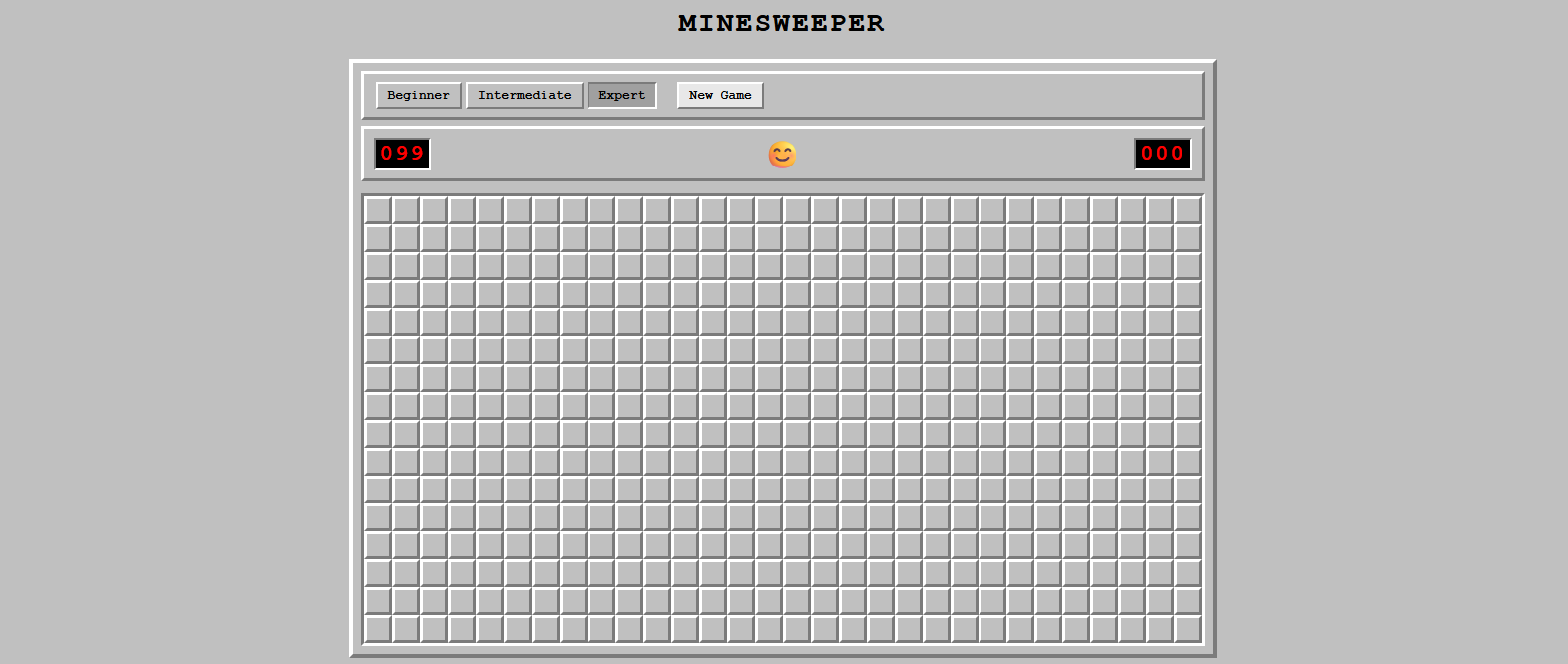
http://localhost:3000in your browser.It works. I’ll admit I sat there clicking cells for longer than strictly necessary for journalistic purposes. There’s something satisfying about a clean flood-fill cascading across an empty region of the board – a small digital exhale. The Windows 95 styling is a deliberate nod to nostalgia, and it lands exactly right.
Architecture recap
constants/gameConfig.js
    ↓ imported by
engine/boardFactory.js ──────────┐
engine/gameEngine.js  ───────────┤
                                 ↓
                        hooks/useGameState.js
                                 ↓
                           App.jsx (wiring)
                          /       |       \
          GameControls   GameStatus   GameBoard
                                          ↓
                                        Cell × N

Each arrow represents a dependency. No arrow points upward — there are no circular dependencies. The engine modules sit at the bottom with no imports from React at all.
That last point – “no imports from React” in the engine modules – is a deliberate architectural choice with practical consequences. It means the game logic can be tested with plain Jest, with no React rendering overhead. It means the engine could be extracted into a shared library and reused by a CLI version, a mobile version, or a completely different frontend framework, with zero changes. It means the logic and the view are genuinely separate, not just nominally separate.
In practice, this kind of clean layering is surprisingly rare. ReactJS’s ubiquity makes it tempting to lean on hooks and context even in places where a plain function would do. The discipline of keeping the engine framework-agnostic is the discipline that makes software last.
Key lessons from the session
1. Plan before you prompt
Every implementation prompt in this session referenced a specific decision from Part 1. Claude never had to guess the architecture – it was already agreed. This saved several rounds of revision.
I cannot overstate how much the thirty minutes of planning saved. Every prompt in Part 2 was narrow and specific because the decisions were already made. “Implement boardFactory.js as discussed” is a much more productive prompt than “Build me the board thing.” The planning session is not overhead – it’s the multiplier.
2. Pure functions are your best friend
Because boardFactory and gameEngine are pure, their tests require zero mocking and run in milliseconds. The test-to-code ratio for these modules is nearly 1:1 and they achieve 100% branch coverage.
I have made this argument in team meetings more times than I can count: push side effects to the edges, keep the core logic pure. The payoff in testability is enormous and the cost is essentially nothing. The functional programming community has been saying this for decades. It’s nice to watch it demonstrated concretely.
3. Mock at the right layer
Math.random() is the enemy of deterministic tests. Rather than seeding the RNG, spying on placeMines lets us inject a board with known mine positions – tests describe exactly what scenario they cover. And as we discovered, the design of the injected board matters: a carelessly designed mock board can accidentally trigger the wrong game state.
The Strict Mode debugging session reinforced something I already believed but now believe more viscerally: understand why your test is failing before you fix it. The first “fix” would have been to suppress the mock behavior differently. The real fix was to understand what React Strict Mode was doing and redesign the test strategy accordingly. The right fix taught us something. The quick fix would have left a fragile test and a gap in understanding.
4. Separate state from display
Keeping the timer in useGameState (not in GameStatus) means GameStatus tests never need act(() => jest.advanceTimersByTime(...)) boilerplate. They just receive time as a prop and render it.
Every hour spent arguing for this separation in design sessions has been worth it. Pure display components are gifts to future maintainers. They can be understood, tested, and modified without knowing anything about where the data came from.
5. React.memo matters for grids
On Expert difficulty the board has 480 cells. Without React.memo, the 1-second timer tick would trigger 480 Cell re-renders per second. With memo, only GameStatus re-renders.
Performance work is usually reactive – something’s slow, let’s figure out why. Applying
React.memoproactively to a known-large grid is the rarer, more valuable discipline: reasoning about performance before it becomes a problem.
What Claude CLI added to the workflow
| Task | Without Claude | With Claude |
|---|---|---|
| Architecture decisions | Research + trial/error | Reasoned plan in minutes |
| Boilerplate | Hand-typed | Generated instantly |
| Edge-case coverage | Easy to forget | Systematically surfaced |
| ARIA attributes | Often an afterthought | Included in first pass |
| Proactive suggestions | Manual review cycle | Flagged before being asked |
| Debugging | Solo investigation | Collaborative diagnosis |
That last row wasn’t in my original mental model for this experiment. I expected Claude to be fast at producing code. I expected it to have reasonable design instincts. What I didn’t fully expect was the quality of the debugging collaboration — the ability to describe a failure, have the root cause correctly identified, and receive a well-reasoned alternative strategy.
I’ve been skeptical of the more breathless AI proclamations for reasons I’ve already described — the industry has a long history of overpromising intelligent systems. But skepticism is not the same as closed-mindedness, and the evidence in front of me after this session is not easy to dismiss. The architecture was sound. The code was clean. The tests were thorough. The debugging was sharp.
This didn’t feel like using a tool. It felt like working with someone.
Checkout the finished web application and the source code created by claude.
