Last updated on April 9, 2026
Why TDD?
Test-Driven Development flips the usual workflow on its head: instead of writing code and then testing it, you write a failing test first, then write just enough code to make it pass, then clean up. The result is a growing suite of tests that document exactly what the code must do — and a codebase that is only as complex as the tests demand.
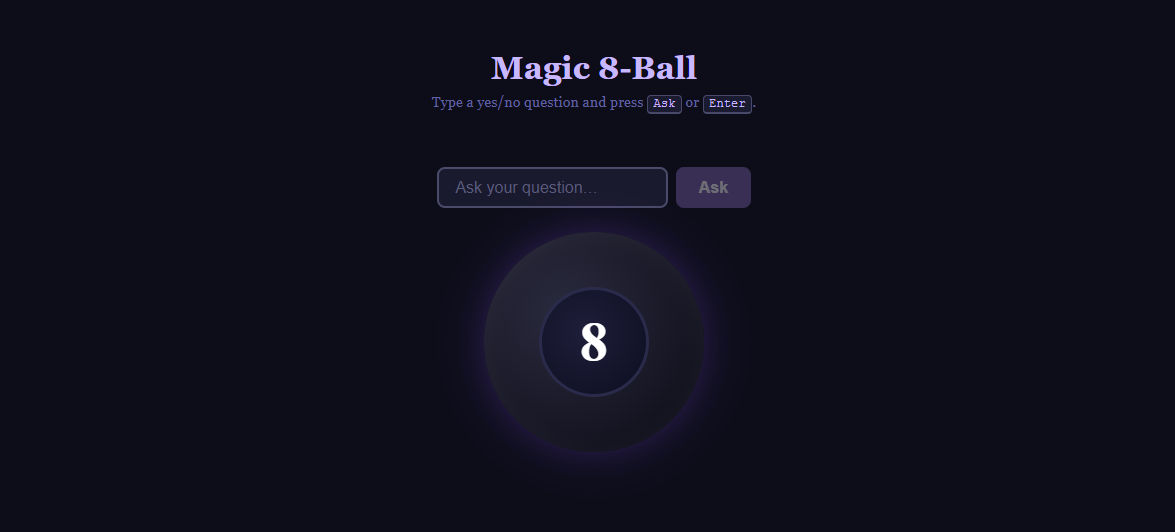
We will build a classic toy app — a Magic 8-Ball (Github)— from scratch using this discipline.
The Red → Green → Refactor Cycle
Every increment of TDD follows three phases:
| Phase | Goal |
|---|---|
| 🔴 Red | Write a failing test that describes desired behavior |
| 🟢Green | Write the minimum code to make the test pass |
| 🔵Refactor | Clean up without breaking tests |
Minimum means minimum. Resist the urge to write a clever general solution before the test demands it. Passing the test is the only goal in the Green phase.
1 · Project Setup
Scaffold a Vite + React project and add the test toolchain:
npm create vite@latest magic-8-ball -- --template react
cd magic-8-ball && npm install
npm install -D vitest @testing-library/react \
               @testing-library/jest-dom \
               @testing-library/user-event jsdom
Wire Vitest into vite.config.js:
// vite.config.js
export default defineConfig({
  plugins: [react()],
  test: {
    environment: 'jsdom',
    globals: true,
    setupFiles: './src/setupTests.js',
  },
})
// src/setupTests.js
import '@testing-library/jest-dom'Add test scripts to package.json:
"test":       "vitest run",
"test:watch": "vitest"
2 · Iteration 1 — The Answers Data Layer
🔴 Red: write the tests first
Before a single answer exists, write tests that describe the exact shape of the data we need.
// src/magic8ball/answers.test.js
import { ANSWERS, getRandomAnswer, getAnswersByType } from './answers'

describe('Magic 8-Ball answers', () => {
  it('contains exactly 20 answers', () => {
    expect(ANSWERS).toHaveLength(20)  // 🔴 RED — file doesn't exist yet
  })

  it('every answer has a text and a type', () => {
    ANSWERS.forEach((answer) => {
      expect(answer).toHaveProperty('text')
      expect(answer).toHaveProperty('type')
    })
  })

  it('contains exactly 10 positive answers', () => {
    expect(getAnswersByType('positive')).toHaveLength(10)
  })

  it('contains exactly 5 neutral answers', () => {
    expect(getAnswersByType('neutral')).toHaveLength(5)
  })

  it('contains exactly 5 negative answers', () => {
    expect(getAnswersByType('negative')).toHaveLength(5)
  })

  it('getRandomAnswer returns an answer from the list', () => {
    const answer = getRandomAnswer()
    expect(ANSWERS).toContainEqual(answer)
  })

  it('getRandomAnswer returns different answers over many calls', () => {
    const results = new Set(Array.from({ length: 50 }, () => getRandomAnswer().text))
    expect(results.size).toBeGreaterThan(1)
  })
})
Run npm test. All seven tests fail — the file does not exist yet. That red bar is the signal to start coding.
🟢 Green: implement the answers module
Create src/magic8ball/answers.js with exactly 20 answers split across the three categories (10 positive · 5 neutral · 5 negative) and export two helpers.
// src/magic8ball/answers.js
export const ANSWERS = [
  { text: 'It is certain',           type: 'positive' },
  { text: 'It is decidedly so',      type: 'positive' },
  { text: 'Without a doubt',         type: 'positive' },
  { text: 'Yes definitely',          type: 'positive' },
  { text: 'You may rely on it',      type: 'positive' },
  { text: 'As I see it, yes',        type: 'positive' },
  { text: 'Most likely',             type: 'positive' },
  { text: 'Outlook good',            type: 'positive' },
  { text: 'Yes',                     type: 'positive' },
  { text: 'Signs point to yes',      type: 'positive' },
  { text: 'Reply hazy, try again',   type: 'neutral'  },
  { text: 'Ask again later',         type: 'neutral'  },
  { text: 'Better not tell you now', type: 'neutral'  },
  { text: 'Cannot predict now',      type: 'neutral'  },
  { text: 'Concentrate and ask again', type: 'neutral' },
  { text: "Don't count on it",       type: 'negative' },
  { text: 'My reply is no',          type: 'negative' },
  { text: 'My sources say no',       type: 'negative' },
  { text: 'Outlook not so good',     type: 'negative' },
  { text: 'Very doubtful',           type: 'negative' },
]

export function getRandomAnswer() {
  return ANSWERS[Math.floor(Math.random() * ANSWERS.length)]
}

export function getAnswersByType(type) {
  return ANSWERS.filter((a) => a.type === type)
}
Run the tests again — all seven are green.
🔵 Refactor
The data layer is simple; no refactoring is needed. Move on.
3 · Iteration 2 — Rendering the Component
🔴 Red: describe what the UI must look like
Write component tests using semantic queries — roles and accessible names — so the tests are resilient to visual changes.
// src/magic8ball/Magic8Ball.test.jsx
import { render, screen } from '@testing-library/react'
import Magic8Ball from './Magic8Ball'

describe('Magic8Ball rendering', () => {
  it('renders a question input', () => { // 🔴 RED — component doesn't exist
    render(<Magic8Ball />)
    expect(
      screen.getByRole('textbox', { name: /your question/i })
    ).toBeInTheDocument()
  })

  it('renders an Ask button', () => {
    render(<Magic8Ball />)
    expect(
      screen.getByRole('button', { name: /ask/i })
    ).toBeInTheDocument()
  })

  it('displays the ball with the 8 by default', () => {
    render(<Magic8Ball />)
    expect(screen.getByText('8')).toBeInTheDocument()
  })

  it('disables Ask when input is empty', () => {
    render(<Magic8Ball />)
    expect(
      screen.getByRole('button', { name: /ask/i })
    ).toBeDisabled()
  })
})
🟢 Green: the minimal component
Build only what the tests demand: an input with aria-label, a disabled button, and a ball element. No styles yet.
// src/magic8ball/Magic8Ball.jsx — first pass
import { useState } from 'react'

export default function Magic8Ball() {
  const [question, setQuestion] = useState('')

  return (
    <div>
      <input
        type="text"
        value={question}
        onChange={(e) => setQuestion(e.target.value)}
        placeholder="Ask your question…"
        aria-label="Your question"
      />
      <button disabled={!question.trim()}>Ask</button>
      <div role="img" aria-label="Magic 8-Ball">
        <span>8</span>
      </div>
    </div>
  )
}
All four rendering tests pass.
🔵 Refactor
Add CSS Modules. The tests do not care about class names, so they stay green while the visual design improves.
4 · Iteration 3 — The Shake Interaction
Key TDD pattern: mock at the boundary.
We mockgetRandomAnswerso the test controls which answer is returned. The unit under test is the component’s reaction, not the randomness.Dependency injection for time.
The animation delay is passed as ashakeDelayprop (default700ms). Tests passshakeDelay={0}so they never need fake timers — no deadlock betweenuserEventandvi.useFakeTimers().
🔴 Red: test the shake behaviour
// src/magic8ball/Magic8Ball.test.jsx — interaction suite
import { describe, it, expect, vi, beforeEach, afterEach } from 'vitest'
import { render, screen, waitFor } from '@testing-library/react'
import userEvent from '@testing-library/user-event'
import Magic8Ball from './Magic8Ball'
import * as answers from './answers'

// shakeDelay={0} collapses the animation window to zero —
// no fake timers needed, tests stay fast and deterministic.
function setup() {
  const user = userEvent.setup()
  render(<Magic8Ball shakeDelay={0} />)
  return { user }
}

describe('Magic8Ball interaction', () => {
  beforeEach(() => {
    vi.spyOn(answers, 'getRandomAnswer').mockReturnValue({
      text: 'It is certain',
      type: 'positive',
    })
  })

  afterEach(() => vi.restoreAllMocks())

  it('enables the Ask button once a question is typed', async () => {  // 🔴 RED
    const { user } = setup()
    await user.type(screen.getByRole('textbox'), 'Will I succeed?')
    expect(screen.getByRole('button', { name: /ask/i })).not.toBeDisabled()
  })

  it('shows the answer after shaking', async () => {
    const { user } = setup()
    await user.type(screen.getByRole('textbox'), 'Will I succeed?')
    await user.click(screen.getByRole('button', { name: /ask/i }))

    await waitFor(() => {
      expect(screen.getByText('It is certain')).toBeInTheDocument()
    })
  })

  it('submits when Enter is pressed in the input', async () => {
    const { user } = setup()
    await user.type(screen.getByRole('textbox'), 'Will I succeed?')
    await user.keyboard('{Enter}')

    await waitFor(() =>
      expect(screen.getByText('It is certain')).toBeInTheDocument()
    )
  })

  it('does not call getRandomAnswer when question is blank', async () => {
    const { user } = setup()
    await user.click(screen.getByRole('button', { name: /ask/i }))
    expect(answers.getRandomAnswer).not.toHaveBeenCalled()
  })
})
🟢 Green: wire up the handler
Add handleShake with the injected delay and attach it to both the button’s onClick and the input’s onKeyDown.
// src/magic8ball/Magic8Ball.jsx — shake handler added
export default function Magic8Ball({ shakeDelay = 700 }) {
  const [question, setQuestion] = useState('')
  const [answer, setAnswer]     = useState(null)
  const [shaking, setShaking]   = useState(false)

  function handleShake() {
    if (!question.trim()) return
    setShaking(true)
    setAnswer(null)

    setTimeout(() => {   // 🟢 GREEN — injected delay
      setAnswer(getRandomAnswer())
      setShaking(false)
    }, shakeDelay)
  }

  function handleKeyDown(e) {
    if (e.key === 'Enter') handleShake()
  }

  // … JSX with onClick={handleShake} and onKeyDown={handleKeyDown}
}
🔵 Refactor
Add verdict text below the ball (✓ Positive outlook, ? Unclear, ✗ Negative outlook) based on answer.type. Write the tests first, watch them fail, then add the JSX — same cycle, smaller loop.
5 · Test Suite Overview
The finished project has two test files and 18 tests in total:
| File | Suite | Tests |
|---|---|---|
answers.test.js | answers data | 7 |
Magic8Ball.test.jsx | rendering | 4 |
Magic8Ball.test.jsx | interaction | 7 |
Run npm test to verify all 18 pass, or npm run test:watch during development for instant feedback on every save.
Key Takeaways
- Tests are specifications. Writing them first forces you to think about the API and behaviour before implementation details.
- Small cycles prevent over-engineering. The “minimum code to pass” rule stops you building things you do not need yet.
- Mock at boundaries, not inside. Mocking
getRandomAnswerlets the component tests be deterministic without touching the answers module tests. - Inject time as a dependency. A
shakeDelayprop (defaulting to700) lets tests pass0instead of fighting fake-timer deadlocks — a practical pattern for any timed UI behaviour. - Semantic queries make tests resilient.
getByRoleandaria-labelsurvive CSS and markup refactors that would break class-name or text selectors.

Be First to Comment